Applies to: Valheim on the Gravel Host Panel · Time: about 5 minutes · Difficulty: Beginner
Give players admin rights on your Valheim server by adding their Steam IDs to adminlist.txt. Admins can kick, ban and unban players from the in-game console.
¶ Before you start
- A Valheim server with Gravel Host. No server yet? Get one here
- The Steam ID (SteamID64, 17 digits) of each player you want to make admin. Look it up on steamid.io.
¶ Steps
- Open the File Manager.
- Go to
/valheim/.config/unity3d/IronGate/Valheim/and findadminlist.txt. - Right-click
adminlist.txtand click Edit. - Paste the Steam IDs of the players you want to make admin, one per line.
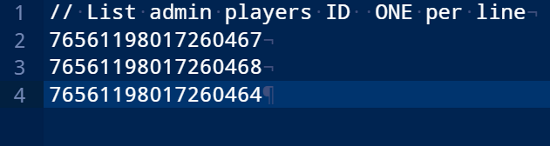
- Click Save and close the file.
- Restart the server.
¶ Check it worked
Join the server as one of the admins. The admin commands below now work in the in-game console.
¶ Admin commands
| Command | Description |
|---|---|
help |
Shows the available commands. |
kick [name/ip/userID] |
Kicks the user specified. |
ban [name/ip/userID] |
Bans the user specified. |
unban [name/ip/userID] |
Unbans the user specified. |
banned |
Shows a list of all banned users. |
ping |
Measures server ping. |
lodbias [number] |
Sets the render distance for the server, between 1 and 5. |
¶ Troubleshooting
¶ Admin commands do not work
Check that each line in adminlist.txt is a single SteamID64, and that you saved the file and restarted the server afterwards.
¶ Related guides
Still stuck? Our team is on Discord, or open a ticket from the Billing Panel.