Applies to: ARK: Survival Evolved on the Gravel Host Panel · Time: about 10 minutes · Difficulty: Intermediate
Change what items cost to craft on your ARK: Survival Evolved server by adding crafting cost overrides to Game.ini.
¶ Before you start
- An ARK: Survival Evolved server with Gravel Host. No server yet? Get one here
Stop your server before you edit the file. Changes made while the server is online are not applied.
¶ Steps
-
Open the Game Settings tab.
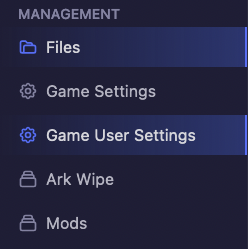
-
Find the
[/script/shootergame.shootergamemode]section. If it does not exist, create it. -
Add your crafting recipe override under that section. Each override goes on one single line. For example:
[/script/shootergame.shootergamemode] ConfigOverrideItemCraftingCosts=(ItemClassString="PrimalItemResource_Wood_C",BaseCraftingResourceRequirements=((ResourceItemTypeString="PrimalItemResource_Thatch_C",BaseResourceRequirement=2.0,bCraftingRequireExactResourceType=False),(ResourceItemTypeString="PrimalItemResource_Flint_C",BaseResourceRequirement=1.0,bCraftingRequireExactResourceType=False))) -
Change the values to suit you.
ItemClassStringis the item whose recipe you change. EachResourceItemTypeStringis a resource in the recipe, andBaseResourceRequirementis how many of it the recipe needs. -
Save the file and start your server.
¶ Check it worked
Open the item's crafting recipe in game. It shows the new resource costs.
¶ Troubleshooting
¶ The recipe did not change
Check that each override is on one line under [/script/shootergame.shootergamemode], and that the server was offline while you edited. Then save and start the server again.
¶ Related guides
- How to Change the Harvest Rate on Your ARK: Survival Evolved Server
- How to Set the Dino Level Cap on Your ARK: Survival Evolved Server
- How to Add Mods to Your ARK: Survival Evolved Server
Still stuck? Our team is on Discord, or open a ticket from the Billing Panel.