Applies to: ARK: Survival Ascended on the Gravel Host Panel · Time: about 5 minutes · Difficulty: Beginner
Change how many resources players gather on your ARK: Survival Ascended server by setting the harvest amount multiplier in GameUserSettings.ini.
¶ Before you start
- An ARK: Survival Ascended server with Gravel Host. No server yet? Get one here
- Prefer video? Watch How To Make an ARK Server in 2026 (Without Touching Config Files) on our YouTube channel. This part starts at 0:45.
Stop your server before you edit the file. Changes made while the server is online are not applied.
¶ Steps
-
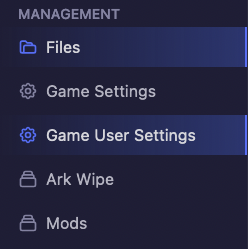
Open the GameUserSettings tab.
-
Find the
[ServerSettings]section. If it does not exist, create it. -
Inside the
[ServerSettings]section, add or change this line:HarvestAmountMultiplier=VALUE
-
Replace
VALUEwith the multiplier you want. For example, to double the amount of resources gathered, set it to2.0. -
Save the changes to the
GameUserSettings.inifile. -
Start your server to apply the changes.
¶ Check it worked
Gather a resource in game. Each hit gives more (or fewer) resources than before, in line with your multiplier.
¶ Troubleshooting
¶ My change was not applied
The server was running while you edited the file. Stop the server, make the change again, save, then start the server.
¶ Related guides
- How to Set the Dino Level Cap on Your ARK: Survival Ascended Server
- How to Change Crafting Recipes on Your ARK: Survival Ascended Server
- How to Change the Map on Your ARK: Survival Ascended Server
Still stuck? Our team is on Discord, or open a ticket from the Billing Panel.