Applies to: Counter-Strike 2 on the Gravel Host Panel · Time: about 5 minutes · Difficulty: Beginner
Join your own Counter-Strike 2 server with its IP address and port, either through the developer console or by saving it in the server browser.
¶ Before you start
- A Counter-Strike 2 server with Gravel Host. No server yet? Get one here
- Counter-Strike 2 installed on Steam.
¶ Steps
¶ Get your server address
- In the panel, find the
IP Address:Portsection for your server.
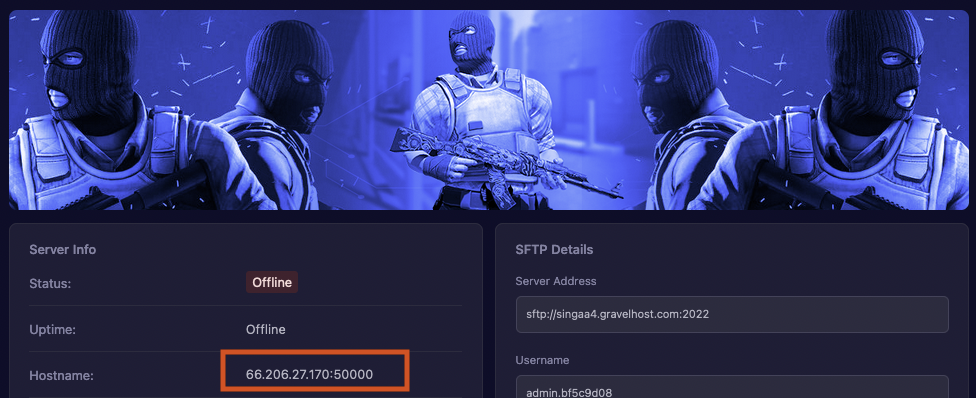
- Copy the
IP Address:Portand keep it for the next steps.
¶ Option 1: Connect from the console
- Launch Counter-Strike 2 on Steam and open the Settings menu in the top left corner.
- In the Game category, find Enable Developer Console.
- Change it from No to Yes in the dropdown on the right.

- Press
~on your keyboard to open the console. - Type
connect IP:PORT, replacingIP:PORTwith the address you copied, and press Enter.

¶ Option 2: Add the server to your favourites
- In the Counter-Strike 2 main menu, click Play at the top.
- Click the Community Server Browser button.

- Click OK. The Game Servers list opens.
- Press the + button at the bottom and enter your
IP Address:Portto add the server to your favourites.

- Select your server and click Connect.
¶ Check it worked
The game loads into your server. If the server has a password, you are asked to enter it before you join.
¶ Related guides
- Counter-Strike 2 Server Console Commands
- How to Change the Default Map on Your Counter-Strike 2 Server
- How to Add Custom Maps to Your Counter-Strike 2 Server
Still stuck? Our team is on Discord, or open a ticket from the Billing Panel.