Applies to: Palworld on the Gravel Host Panel · Time: about 5 minutes · Difficulty: Beginner
Set an admin password from the panel, then use it in game to unlock admin commands for broadcasting messages, banning players, teleporting and saving world data.
¶ Before you start
- A Palworld server with Gravel Host. No server yet? Get one here
¶ Steps
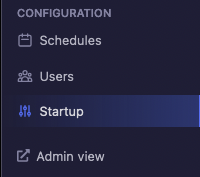
- In the Gravel Host Panel, click Startup at the bottom left.
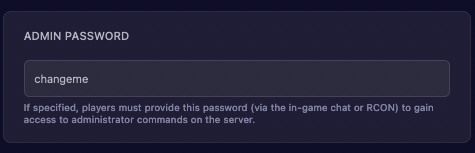
- Under Variables, set the Admin Password field to anything you want.
- Go back to the main panel page and Restart the server.
- Join the server once it is online.
- Open chat and enter
/AdminPassword [password], replacing[password]with the password you set.

¶ Check it worked
The game shows the message "You are now an Admin".
¶ Admin commands
These commands help you manage your server. Enter them in chat once you are an admin.
| Command | Description |
|---|---|
/Info |
Displays general server information. |
/Save |
Saves all world data. |
/Broadcast [text] |
Sends a message to all players. |
/ShowPlayers |
Lists all active players on the server. |
/TeleportToPlayer [SteamID] |
Teleports you to another player. |
/TeleportToMe [SteamID] |
Teleports another player to you. |
/KickPlayer [SteamID] |
Removes a player from the server. |
/BanPlayer [SteamID] |
Permanently bans a player from the server. |
/Shutdown [seconds] [text] |
Shuts down the server after the given number of seconds, with optional text. |
/DoExit |
Forcibly stops the server. |
¶ Troubleshooting
¶ The admin password is not accepted
The password must match the Admin Password field exactly. If you changed it, restart the server before you try again.
¶ Related guides
- How to Join Your Palworld Server
- How to Set a Password on Your Palworld Server
- Common Palworld Server Issues and Fixes
Still stuck? Our team is on Discord, or open a ticket from the Billing Panel.