Applies to: Valheim on the Gravel Host Panel · Time: about 10 minutes · Difficulty: Beginner
Move a world you already play on your Windows PC onto your Valheim server, so you and your friends can keep building where you left off.
¶ Before you start
- A Valheim server with Gravel Host. No server yet? Get one here
- The world you want to upload, saved on a Windows PC.
Stop your server before you upload the files. A running server can overwrite them when it saves.
¶ Steps
¶ Find your world files
- Press
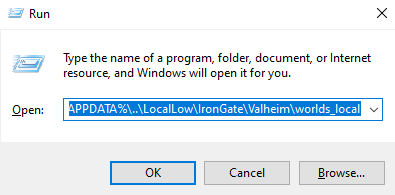
Win + Ron your keyboard. - In the Run window, paste
%APPDATA%\..\LocalLow\IronGate\Valheim\worlds_localand press Enter. This opens\LocalLow\IronGate\Valheim\worlds_local. If your world is not there, also check theworldsfolder.
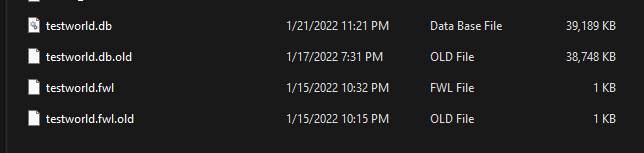
- Find the
.dband.fwlfiles with your world's name.
¶ Upload them to your server
- In the panel, open the File Manager.
- Go to
/.config/unity3d/IronGate/Valheim/worlds_local/. - Upload both the
.dband.fwlfiles to this folder. - Set World Name to match the name of the
.fwland.dbfiles, without the extension. - Save, then start your server.
¶ Check it worked
Join the server. Your old world loads with everything you built.
¶ Troubleshooting
¶ The server starts a new, empty world
World Name does not match the file names exactly. Fix the name, save, and restart the server.
¶ Related guides
Still stuck? Our team is on Discord, or open a ticket from the Billing Panel.