Applies to: Sons of the Forest on the Gravel Host Panel · Time: about 5 minutes · Difficulty: Advanced
Install the RedLoader mod framework and deploy custom gameplay plugins on your Sons of the Forest dedicated server using the Gravel Host panel.
¶ Before you start
-
An active Sons of the Forest dedicated server on Gravel Host. Order or manage your server here
-
Panel access with File Manager permissions.
-
Download the latest standalone RedLoader server release zip from GitHub or the official Sons of the Forest modding community.
-
Stop container requirement: Always stop your server container in the Gravel Host panel before uploading or updating mod files. Modifying executable DLLs or mod assemblies while the game process is running can cause memory lock errors and container boot loops.
¶ Steps
-
Stop your Sons of the Forest server container: Open your Gravel Host server dashboard and click the red Stop button in the top controls. Wait until the status badge indicates OFFLINE.

-
Upload RedLoader binaries to the container root: In the left sidebar, click Files to open the File Manager. Click the highlighted Upload button in the top right corner (1) and select your downloaded
RedLoader.zipfile (or drag and drop it into the file list). Extract the archive directly into the rootcontainer/folder (2) so thatversion.dlland theRedLoader/directory sit alongsideSonsOfTheForestDS.exe.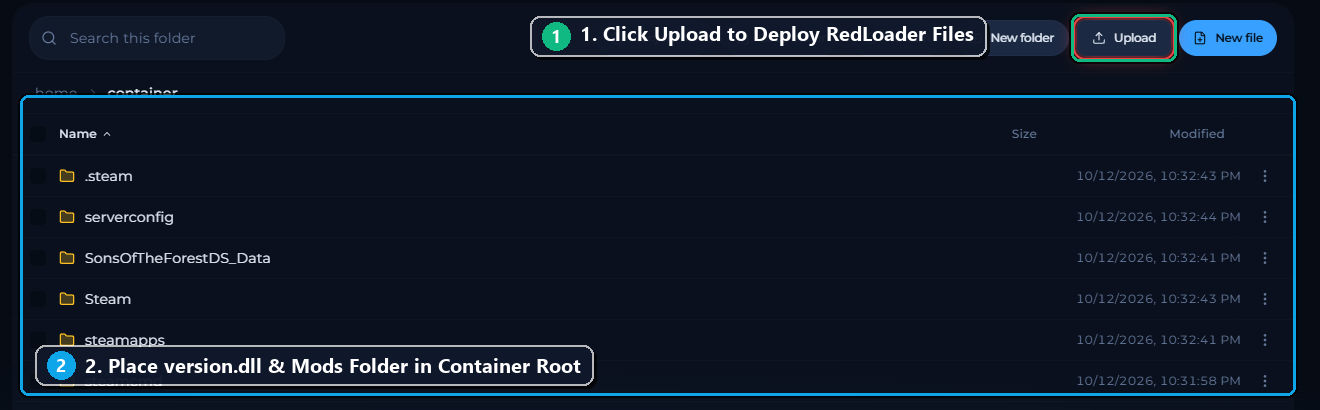
-
Install your mod plugins into the Mods directory: In the File Manager, open the
Mods/directory (created automatically when extracting RedLoader, or create it using the New folder button). Upload your server-compatible.dllmod plugins (such asBuildAnywhere.dllorDayNightSync.dll) directly into this folder. -
Start your server: Return to the server controls header and click the green Start button to launch the server container and initialize RedLoader.

-
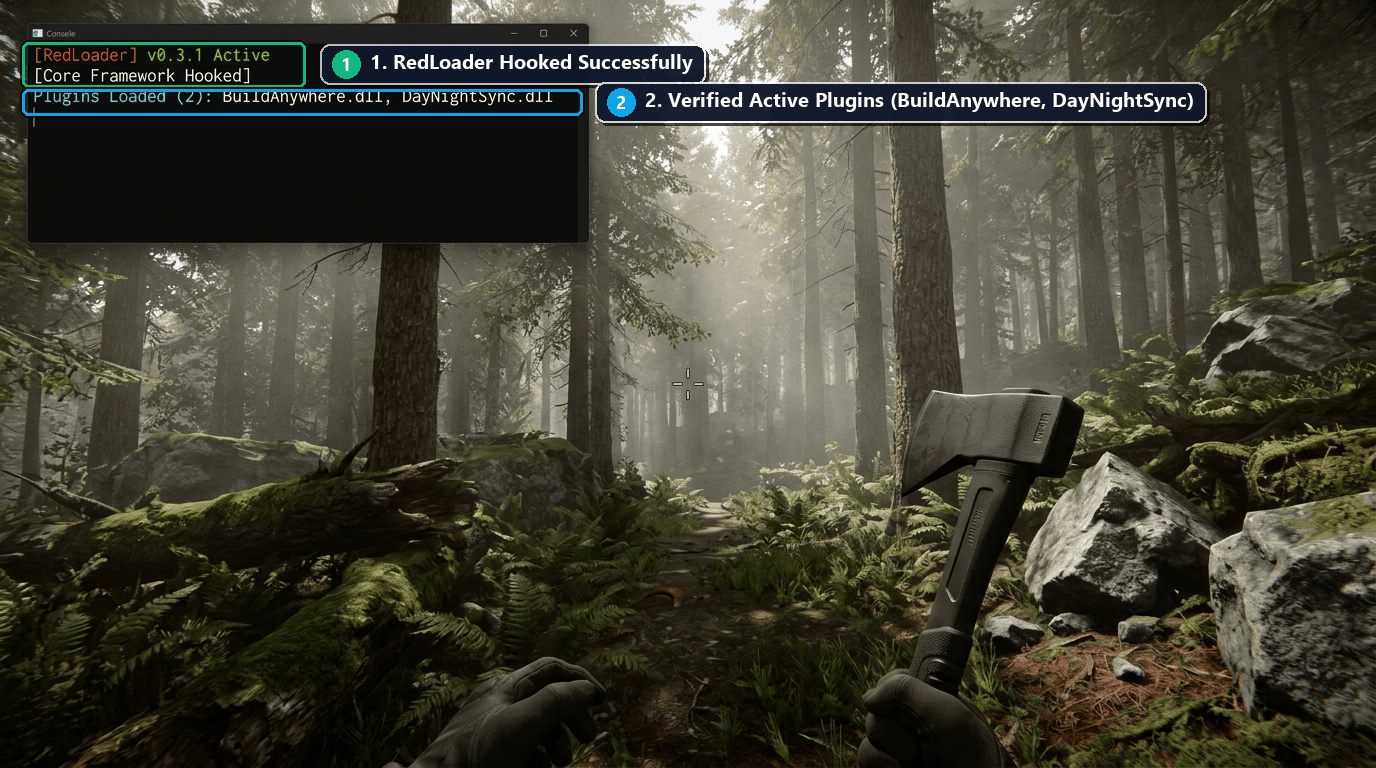
Verify RedLoader hook in-game and in console: Connect to your server from the game client. When loaded into the world, the RedLoader console overlay confirms that the core framework hooked successfully (1) and all custom plugins are actively executing (2).
¶ Check it worked
-
In Panel Console: The Gravel Host console logs confirm initialization:
[RedLoader] v0.3.1 Initializing Core Framework... [RedLoader] Hooked version.dll successfully [RedLoader] Scanning /home/container/Mods... [RedLoader] Loaded 2 Plugins: BuildAnywhere.dll, DayNightSync.dll -
In-Game: Modded mechanics (such as free building restrictions or synchronized weather effects) are immediately functional for connected players.
¶ Troubleshooting
¶ RedLoader does not load (Server boots purely vanilla)
If the console shows normal game startup without any [RedLoader] lines, verify that version.dll was extracted directly into the root container/ folder alongside SonsOfTheForestDS.exe rather than nested inside a subfolder (such as container/RedLoader/version.dll). Ensure the file is named in lowercase version.dll and restart the server.
¶ Server crashes immediately on boot with SIGSEGV or mono error
This happens if 32-bit and 64-bit binaries are mismatched, or if incompatible client-only mods (mods that require local DirectX rendering or camera hooks) are placed in the server's Mods/ folder. Only install plugins specifically tagged for Dedicated Server use. Remove newly added .dll files from Mods/ one by one to identify the conflicting plugin.
¶ Mod settings not saving or resetting
Many RedLoader mods generate their own .cfg configuration files inside UserData/ or Mods/Config/ after the first boot. Always stop the server container before editing these generated config files, exactly as you would with dedicatedserver.cfg.
¶ Related guides
- How to Configure Sons of the Forest Server Settings
- How to Set a Password on Sons of the Forest Server
Still stuck? Our team is on Discord, or open a ticket from the Billing Panel.